
NEWS
LATEST NEWS

Address:3rd Floor,C1 Buliding,Xiangli Industry Park,Heping Haoye Road,Baoan District,Shenzhen,Guangdong,China.
Zip Code: 518103
Phone: +86 13410681808
E-mail:sale@radiocontrollers.com
NEWS
HOMENEWS
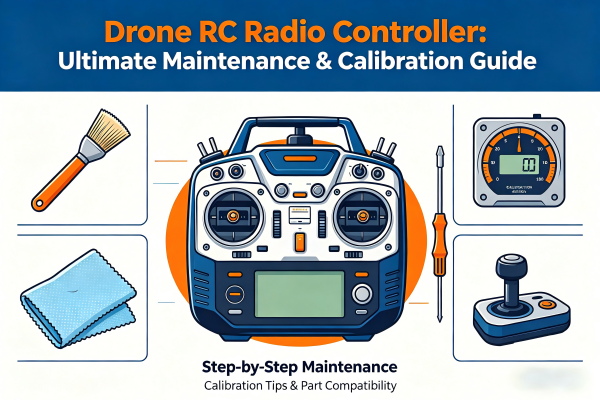
Drone RC Radio Controller: Ultimate Maintenance & Calibration Guide
2026-05-12 10:53:13 View:6A drone RC radio controller is the most critical part of any drone flight system. Without a well-maintained controller, even the most expensive drones can suffer from signal loss, joystick drift, unstable control, or sudden disconnection. Whether you fly for aerial photography, FPV racing, industrial inspection, or agricultural mapping, keeping your controller in top condition is the key to safe, smooth, and reliable flights.
Many drone pilots ignore routine maintenance until serious problems appear. The truth is, nearly 90% of common controller issues are caused by dust, sweat, improper storage, or lack of calibration—not manufacturing defects. This complete guide will walk you through everything you need to know to keep your drone RC controller performing like new.
Table of Contents
1. Why Drone RC Controller Maintenance Really Matters
Drone RC controllers are precision electronic devices with sensitive internal parts: joystick potentiometers, signal antennas, lithium-polymer batteries, control buttons, and circuit boards. Regular use exposes them to dust, sweat, moisture, vibration, and temperature changes.
Without proper maintenance, you may face:
• Uncontrollable joystick drift
• Weak signal or sudden disconnection
• Stuck or unresponsive buttons
• Fast battery drain or unexpected shutdown
• Reduced control range and increased latency
• Shortened overall lifespan of the controller
With simple maintenance steps, you can achieve zero drift, stable signal, long battery life, and maximum durability for your drone RC controller.
2. Pre-Flight & Post-Flight Checklists
Before Every Flight
• Check battery level and avoid low-power flights
• Move joysticks fully to test smoothness
• Test all switches, dials, and function buttons
• Inspect antennas for cracks, bending, or looseness
• Confirm stable connection between controller and drone
• Check display for errors or abnormal data
After Every Flight
• Wipe off surface dust and sweat
• Check for physical damage or loose parts
• Store in a protective case
• Avoid leaving it in hot cars or direct sunlight
3. Step-by-Step Professional Cleaning Guide
Cleaning is the foundation of good maintenance. Dust and sweat are the biggest enemies of drone RC controllers.
Safe Cleaning Rules
• Always power off and remove the battery first
• Use microfiber cloth, soft brush, and 75% alcohol swabs
• Never pour water or spray liquid directly on the device
• Do not use knives, needles, or sharp tools
• Let it dry completely before using again
Complete Cleaning Steps
1. Turn off the controller and remove the battery
2. Use an air blower to remove dust from gaps
3. Wipe the outer shell with a soft cloth
4. Clean around joysticks and buttons with a small brush
5. Wipe charging port and metal contacts
6. Let it air dry in a ventilated place
7. Reinstall battery and test all functions
4. Full Joystick Calibration for Zero Drift
Joystick drift is the most common complaint among drone pilots. Calibration restores precision and stability.
Best Calibration Frequency
Every 1–3 months, or after replacing joysticks, dropping the controller, or flying in extreme temperatures.
How to Calibrate
1. Power on the controller and connect to the official app
2. Place the controller flat on a stable table
3. Open the joystick calibration tool
4. Move both joysticks to all extreme positions
5. Return to center and confirm calibration
6. Test for drift and save settings
Professional standard: error rate should be within ±0.1% to ±0.5% for the best performance.
5. When & How to Replace Wearable Parts
Wearable parts reduce control quality over time. Timely replacement prevents mid-flight failures.
Joysticks & Caps
Replace every 3–6 months if worn, drifting, or stiff.
Controller Battery
Replace every 8–12 months if swollen, draining fast, or not charging fully.
Antennas
Replace every 12–24 months if signal is weak or antenna is broken.
Buttons & Dials
Replace if unresponsive, stuck, or loose.
6. Quick Fixes for Common Controller Faults
Joystick Drift → Clean + calibrate + replace joystick if needed
Signal Loss → Check antenna + battery + firmware update
Button Not Working → Clean dust + replace conductive rubber
Battery Dies Fast → Replace battery + adjust charging habits
Control Delay → Reduce interference + calibrate joysticks
Pairing Failed → Restart system + check antenna + repair connection
Most issues can be solved with cleaning, calibration, and parts replacement.
7. Long-Term Storage Best Practices
• Clean and dry the controller completely
• Keep battery at 50–60% charge
• Remove antennas and joysticks if possible
• Store in a cool, dry, dust-free case
• Avoid heat, humidity, and direct sunlight
• Power on every 1–2 months to maintain battery health
• Calibrate before using after long storage
8. Maintenance Schedule Cheat Sheet
| Maintenance Task | Frequency | Goal | Key Actions |
|---|---|---|---|
| Pre-Flight Check | Every flight | Flight safety | Battery, joysticks, signal, buttons |
| Surface Clean | Weekly | Prevent dust damage | Wipe, blow dust, clean ports |
| Joystick Calibration | 1–3 months | Zero drift | App calibration, full range test |
| Joystick Caps | 3–6 months | Smooth control | Replace, then calibrate |
| Battery Health Check | Monthly | Avoid sudden shutdown | Test life, charging speed |
| Antenna Check | 6–12 months | Strong signal | Inspect damage, replace if needed |
| Full Maintenance | Yearly | Restore performance | Replace parts, deep clean |
9. Most Asked Questions by Drone Pilots
How often should I clean my drone RC controller?
Clean lightly after every flight and deep clean once a week for best results.
Why is my controller joystick drifting?
Dust, wear, or lack of calibration. Clean and calibrate to fix it quickly.
Is a swollen battery dangerous?
Yes. Stop using it immediately and replace it to avoid fire or explosion risks.
How far can a maintained RC controller reach?
3–15km for professional models, depending on antenna quality and environment.
Do I need to calibrate after cleaning?
Yes, it’s highly recommended to ensure stable and accurate control.
A well-maintained drone RC radio controller ensures safer flights, longer equipment life, and better flying experience. By following this ultimate guide, you’ll avoid most common issues and keep your controller in peak condition for years.
RadioControllers provides professional drone RC systems, parts, and maintenance support for pilots worldwide.
Recommend